How I Made VS Code Explain Code Out Loud
I built a coding agent skill that turns any codebase into a narrated audio walkthrough — scout agents, parallel generation, and local TTS running at 200ms.
AI agents are writing code faster than most teams can actually absorb it. A single agent session can produce hundreds of files across a sprint's worth of features — and we now have pretty decent tooling to review whether that code is correct. What we don't have is tooling to help us understand it.
There's a difference. Code review catches bugs. Understanding means knowing why the matching engine processes orders in that order, or what invariant the balance validation is actually enforcing. When code ships faster than we can build that model, we lose agency over our own codebase — even if the tests pass.
This started as an experiment to get some of that back.
Source code: github.com/Royal-lobster/code-explainer · Install: tell the coding agent to install the skill from that URL
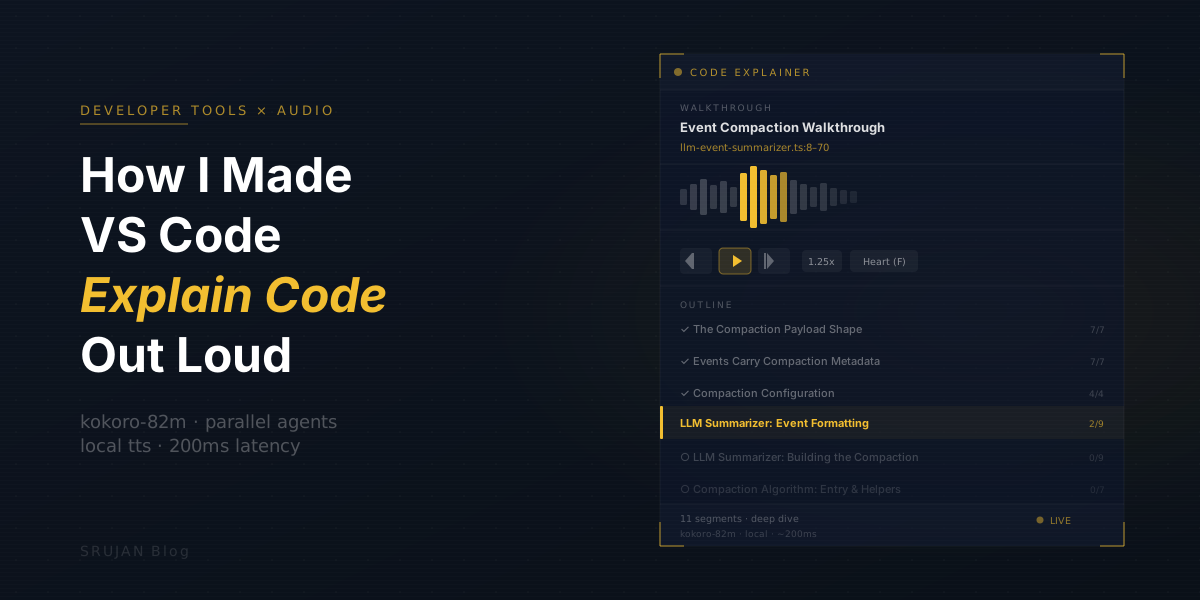
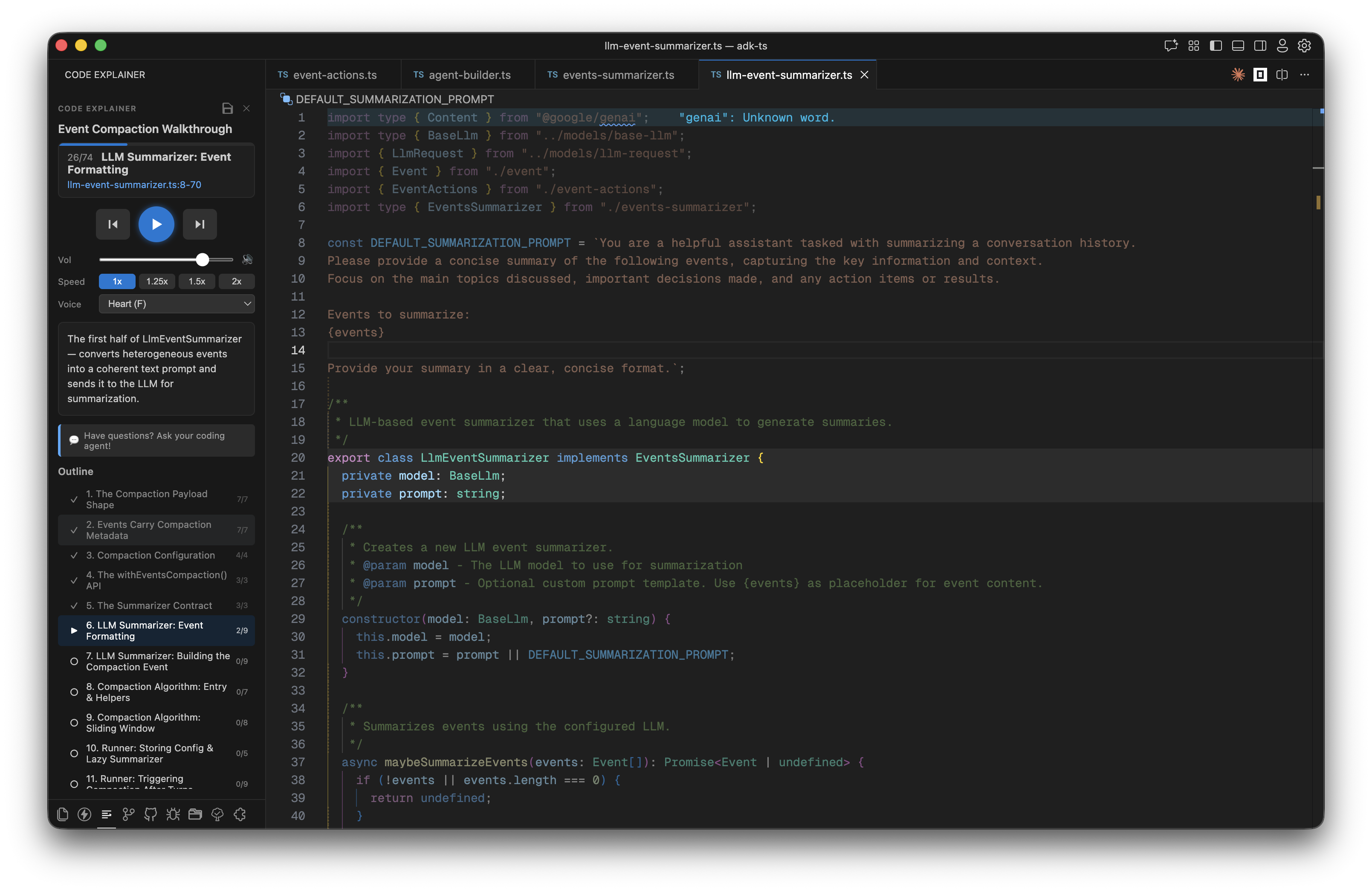
Code Explainer is a coding agent skill that turns a codebase into a narrated audio walkthrough. Tell the agent to explain the authentication system. Within 15 seconds, a voice starts narrating while VS Code scrolls through the relevant code, highlight by highlight.
Where This Started
The best way I've learned a new codebase is having a colleague walk me through it. Not explaining the logic — the logic we can usually read — but explaining why it's written the way it is. The constraint that forced this design. The edge case this weird conditional is actually handling. That context is what's hard to get from the code alone.
Agents write code, but they don't walk us through it afterward. The answer seemed obvious: make the agent do that too. But to replicate the colleague experience, we need two things — a cursor to point at the code, and a voice to explain.
My first idea was a web app: connect our GitHub, get a chat interface with a code panel and a pointer that could highlight lines as the AI talked. Clean, monetizable. I also immediately lost interest in it. Building another SaaS wrapper felt like the wrong move when the real insight was simpler.
The better version: make it a skill that runs inside the coding agent we're already paying for. No new subscriptions, no new accounts. Our agent, our codebase, our terminal.
For voice, on-device TTS models for Mac have gotten surprisingly good — Kokoro-82M in particular. For the cursor, I first tried driving VS Code with shell scripts that could open files and set selection ranges. It worked, but it was brittle. A VS Code extension gave proper API access to the editor state and made the highlighting actually reliable.
The first version had the coding agent control everything via text commands — play, pause, skip to 4, typed into the chat. It was functional but awkward. Over a few iterations, I moved the playback controls into the extension sidebar and added a WebSocket bridge between the extension and the agent. Now the user can control playback either way — buttons in the sidebar or text in the chat — and the agent always knows the current state via endpoints, so questions like "wait, what does this function actually return?" work correctly mid-walkthrough.
The extension can also push new segments on the fly. If we ask a tangent question, the agent can insert a new segment explaining exactly that — or modify an existing one — without stopping the walkthrough.
The Architecture
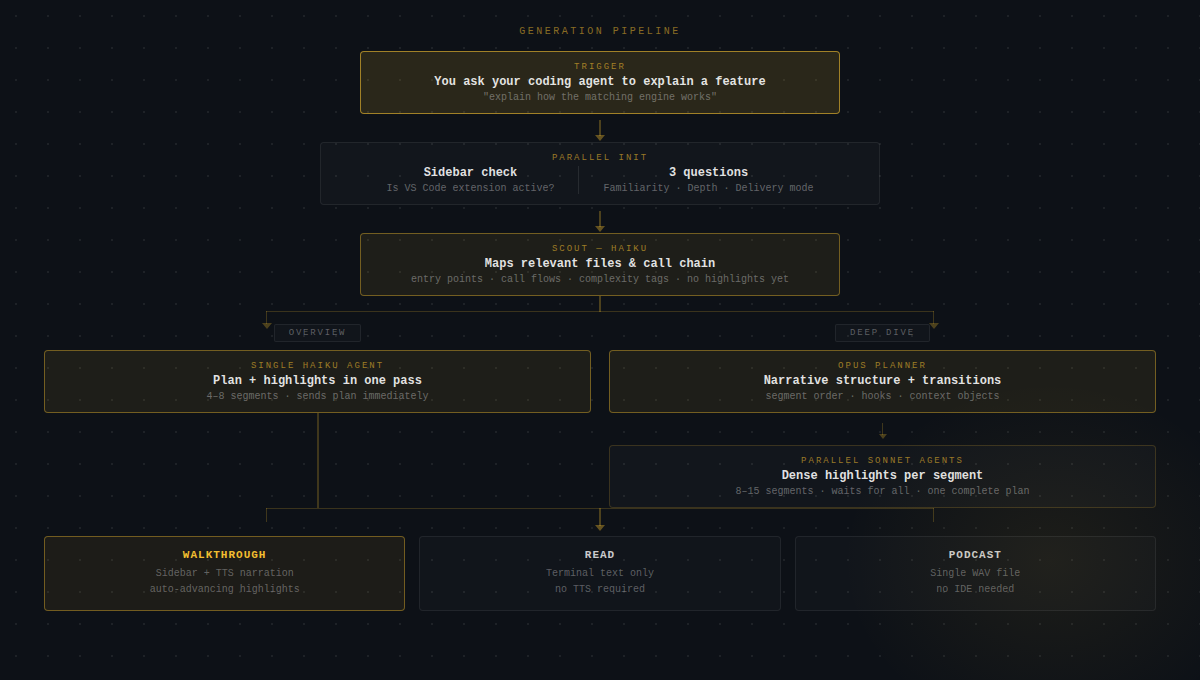
Before generating anything, two things happen in parallel: the skill checks whether the VS Code sidebar extension is active, and asks three questions — how familiar we are with this part of the codebase, whether we want an Overview or Deep Dive, and which delivery mode we prefer. Both happen in the same response, so there's no extra round-trip.
Then: Scout. A fast Haiku sub-agent maps the relevant files — traces entry points, follows call chains, figures out what actually matters. It doesn't generate any explanations yet. Discovery only.
What happens next depends on the depth we chose.
Overview is a single Haiku agent that reads the scout output, builds the segment plan, and generates highlights all in one pass. It sends the plan to the sidebar as soon as it's done. Fast — usually ready in under 20 seconds.
Deep Dive is two stages. An Opus planner reads the scout output and builds a narrative structure: segment order, transition objects that link each segment to the next, a hook for how to open each explanation. Then parallel Sonnet agents take each segment from the plan and generate dense highlights — specific line ranges with explanations that actually capture the design decisions. The skill waits until all segment agents are done before sending anything to the sidebar, so we get one complete plan rather than watching it fill in piecemeal.
Local TTS With Kokoro
I didn't want to call an API for every sentence. Network latency would break the narration — we'd hear a pop and a pause before each segment started.
The TTS engine is Kokoro-82M: currently #1 on the TTS Arena leaderboard, 82 million parameters, runs locally on Apple Silicon via mlx-audio. Seven voices: Heart, Bella, Sarah, Adam, Michael, Emma, George. Download once (~330 MB). Narrate forever.
On an M2 MacBook, it renders a typical 30-word segment in under 200ms. Fast enough that audio starts before the highlight animation finishes.
The server doesn't run permanently. After 5 minutes of inactivity it unloads from memory — so it's not sitting around eating RAM while we're doing something else. When we hit play in the sidebar, the extension checks if the TTS server is up; if not, it boots it back up and loads the model before playback starts. The cold-start adds a few seconds the first time, but after that we're back at 200ms per segment.
The voices vary a lot. Heart is warm and measured; George sounds like someone presenting at a conference. I default to Heart because dense technical explanations need a bit of warmth to stay listenable for 15 minutes.
Three Delivery Modes
Walkthrough is the main one. The plan JSON goes to the sidebar, and the extension takes over — opens the file, scrolls to the right range, applies a highlight decoration. The TTS server streams audio over a WebSocket to the sidebar's webview, which plays it through the browser AudioContext. The agent polls a long-poll endpoint so it knows when we've advanced or skipped a segment. Everything stays in sync: the highlighted code, the sidebar explanation text, and the voice narration.
Read mode needs nothing except VS Code. Explanations print in the terminal, the extension highlights the current file and line range, and the agent waits for us to say "next". No audio, no sidebar. Useful when we're screensharing, or just prefer reading.
Podcast generates a single WAV file with no IDE involvement at all. The narration is written to flow as a continuous listen — not the segment-by-segment drip of a walkthrough but a proper through-line. Run it, get a file, listen from our phone. I use this when I need to get up to speed on something before a meeting and don't have time to sit at my editor.
Save and Share
This part surprised me with how useful it turned out to be.
Walkthroughs serialize to JSON: segment order, file paths, line ranges, explanations, voice settings. Drop a .walkthroughs/ folder in the repo and teammates can pull it and replay the exact walkthrough on their own machine. No server, no account, just a file with relative paths.
I've started using saved walkthroughs as a form of documentation. A new contributor asks how the matching engine works — instead of writing a Confluence page nobody will read, I run /explainer on the matching engine, save the walkthrough, and commit it alongside the code. The walkthrough updates whenever someone re-runs the explainer. No wiki page to keep synchronized.
What a Session Looks Like
We're in a new codebase. We type:
Explain how event compaction worksThe scout maps the relevant files, the planner orders the narrative, agents generate highlights in parallel. Thirty seconds later, the sidebar has the full outline — all segments ready, nothing half-finished.
We press play. A voice says: "Event compaction starts with the payload shape — let's look at what an event actually contains." VS Code opens event.ts, scrolls to line 12, highlights the Event interface. The sidebar shows the matching explanation text in sync.
We have a question mid-walkthrough. We type it in the chat. The agent reads the current segment state, grounds its answer in the exact code we're looking at, and replies. The walkthrough keeps going.
No context-switching, no copy-pasting code into a chat window, no losing our place.
Installing It
Works with Claude Code, Cursor, Codex, Amp, Kilo Code, and OpenCode. Tell the coding agent:
Install the code explainer skill from https://github.com/Royal-lobster/code-explainerIt clones the repo, runs setup, installs the VS Code extension, downloads the voice model, and asks us to reload the editor.
Requirements: macOS (Apple Silicon recommended), Python 3.10+, Node.js 18+, VS Code or Cursor.
Linux / Windows: The extension and skill scaffold work fine everywhere — the only Mac-specific piece is mlx-audio, which is how Kokoro runs on Apple Silicon. On Linux or Windows, ask the coding agent to swap the TTS backend. Kokoro runs on both via PyTorch, or we can drop in Piper as a lighter alternative. The agent knows the codebase and can wire it up.
The source is on GitHub. Worth trying on the part of the codebase nobody ever wants to explain.