Why None of My Apps Have a Database
Many of my hobby projects have zero databases — how URLs, browsers, and other people's infrastructure replaced Postgres in my hobby stack.
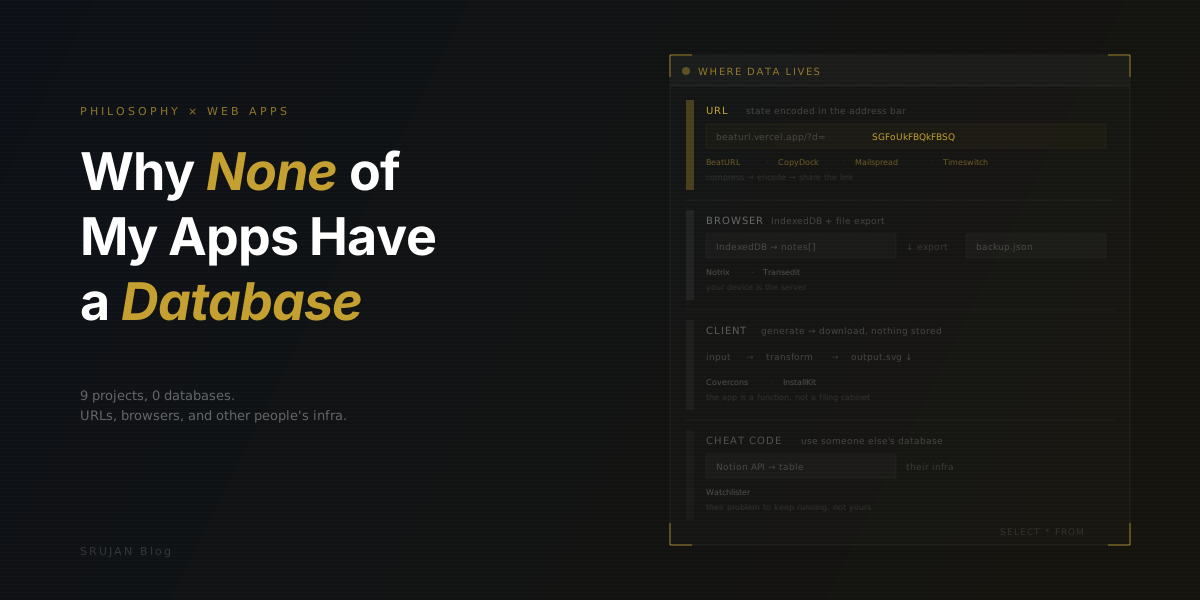
I build full-stack apps professionally, AI agents, agent frameworks, the whole stack from frontend to infrastructure. I know how to set up a database. I've done it plenty of times. But when I open my laptop at night to build something for fun, the first decision I make is: no database.
Not because I can't. Because the fun part of a side project is the product, not the infrastructure.
Many of my hobby projects don't talk to a database. Not SQLite, not Firebase, not a JSON file on S3. And every single one of them works fine.
The Maintenance Tax
Here's the thing about databases in side projects: they don't stay free.
A hobby app with a database is a hobby app with a monthly bill, a connection string you'll forget, schema migrations you'll never run, and a 3 AM alert you'll definitely ignore. It's a server that needs to be up when someone clicks your link. It's CORS headers and auth middleware and rate limiting and backups and all the other stuff that's fine when you're getting paid but absolutely miserable on a Sunday afternoon.
I build side projects because I want to make things, not maintain things. The moment I'm debugging a cold-start timeout on a serverless function that talks to a managed Postgres instance, I've already lost.
So I started asking a different question: where can the data live instead?
Turns out, there are a lot of answers.
The URL Is the Database
My favorite trick. The entire application state gets compressed and encoded into the URL itself. No server needed, no storage, no accounts. You share the link, you share the data. It's stateless in the most literal sense: the state is right there in the address bar.
BeatURL is a drum machine where the beat pattern lives in the URL. An 8-track, 256-step grid compressed into a few dozen characters using adaptive arithmetic coding. I wrote about the compression details in a separate post. The short version: a typical beat compresses to around 22 URL characters. No database could make sharing easier than "copy the link."
Try it live: beaturl.vercel.app · Source code: github.com/Royal-lobster/beaturl
CopyDock takes the same idea and applies it to text. It's a paste/gist tool. Type or paste text, get a shareable URL with the content compressed right into it. Nobody's server storing your snippets, and links don't expire. The URL is the paste. I used a text compression library to keep URLs reasonable even for longer content.
Try it live: copydock.vercel.app · Source code: github.com/Royal-lobster/copydock
Mailspread encodes email templates into URL parameters. You design a template with variables, and it generates a mailto: link with everything baked in. Share the URL with someone and they get the pre-filled email ready to send, without a backend or an email service API.
Try it live: mailspread.netlify.app · Source code: github.com/Royal-lobster/mailspread
Timeswitch lets you share events that display in the viewer's local timezone. The event data (title, date, time) is encoded in the URL. I send someone a link that says "3 PM" and they see it as whatever 3 PM IST is in their timezone. The URL carries everything.
Try it live: timeswitch.vercel.app · Source code: github.com/Royal-lobster/Timeswitch
The URL-as-database pattern has a soft size limit. Long URLs work fine in browsers, but they don't link well. Paste a 3,000-character URL into a chat app and watch it get truncated, wrapped, or mangled. The fix? A link shortener at share time. Which is, yes, technically another external database, but one I don't have to run. The tradeoff is still incredible: zero infrastructure, zero cost, links that work forever (as long as the static site is deployed), and sharing that's as simple as copy-paste.
The Browser Is the Database
Sometimes the data is too big or too personal for a URL. Notes, documents, files you're actively editing. For those, the browser itself has storage, and it works well.
Notrix is a markdown note-taking app. Your notes live in IndexedDB, the browser's built-in database that nobody talks about. It handles structured data, binary blobs, and doesn't have a 5MB cap like localStorage. Notrix stores everything locally, with JSON export/import for backup and migration. Want to share a specific note? It encodes the content into a URL, same as CopyDock.
Try it live: notrix.netlify.app · Source code: github.com/Royal-lobster/notrix
Transedit is a translation file editor. You import a translation file, edit strings in a nice UI, and export the result as a .transedit file. Want to share your work? Transedit uploads the file to catbox.moe, a free file host, and gives you a share link. Open that link and the app fetches the file client-side. The "database" is a file host that someone else runs for free.
Try it live: transedit.vercel.app · Source code: github.com/Royal-lobster/Transedit
The browser-as-database approach has an obvious limitation: your data lives on that device, in that browser. Clear your cache and it's gone. But for a lot of use cases, that's fine. Notes you're drafting, files you're processing, temporary work. Not everything needs to sync across five devices. And when it does need to leave the browser, export to a file. Files have worked fine as a data format for decades.
Nothing to Store
Some apps don't need persistence at all. The user does something, gets a result, and moves on. No state to save, no data to recall.
Covercons generates cover images from icons. Pick some icons, adjust the layout, and it renders an SVG on the client. Download it. Done. The generation happens in the browser, the output goes to your hard drive, and Covercons never knew what you made. There's nothing to store because the product leaves the app immediately.
Try it live: covercons.vercel.app · Source code: github.com/Royal-lobster/Covercons
InstallKit lets you browse a catalog of apps, check the ones you want, and copy a brew install command to your clipboard. That's it. The catalog is static data bundled with the site. Your selection exists for exactly as long as the tab is open. The output is a string in your clipboard. What would a database even do here?
Try it live: installkit.vercel.app · Source code: github.com/Royal-lobster/InstallKit
This is the most underrated pattern. Before reaching for storage, ask: does this data actually need to persist? A surprising number of tools are really just input → transform → output. The user brings the data and takes the result with them. The app is a function, not a filing cabinet.
Use Someone Else's Database
And then there's the cheat code.
Watchlister is a movie/show tracker that uses Notion as its database. The user connects their Notion workspace, and Watchlister reads and writes to a Notion table. I didn't set up a database. I didn't design a schema. I didn't write a single migration. Notion handles storage, sync, backup, and even gives the user a UI to edit their data outside my app.
Try it live: watchlister.vercel.app · Source code: github.com/Royal-lobster/Watchlister
This is the "let someone else deal with it" approach, and it goes further than you'd think. Notion, Google Sheets, Airtable: these are all databases with APIs, and your users probably already have accounts. You get persistence, a backup story, and a familiar interface for free. The catch is you're coupling to someone else's API, but for a hobby project? That's their problem to keep running, not yours.
Why This Works (for Me)
I want to be clear: I'm not saying databases are bad. I'm saying databases are work. And work is exactly what I'm trying to avoid in my side projects.
Every one of these apps deploys as a static site. Vercel and Netlify host them for free. I don't monitor servers, pool connections, back up data, or worry about GDPR compliance. If I abandon a project for two years and someone finds the link, it still works. Try that with a Heroku dyno and a free-tier database.
The constraints are real. You can't build Twitter without a database. You can't build a collaborative editor without some kind of backend state. But most side projects aren't Twitter. Most side projects are small tools that solve a specific problem for a specific person. And for those, the question isn't "which database should I use?" It's "do I need one at all?"
More often than not, the answer is no. And those are the projects I actually finish.